
Smart Clipboard Manager for macOS
Never lose what you copy. ClipArc intelligently organizes your clipboard history with smart content detection, fuzzy search, and one-click paste to any app.
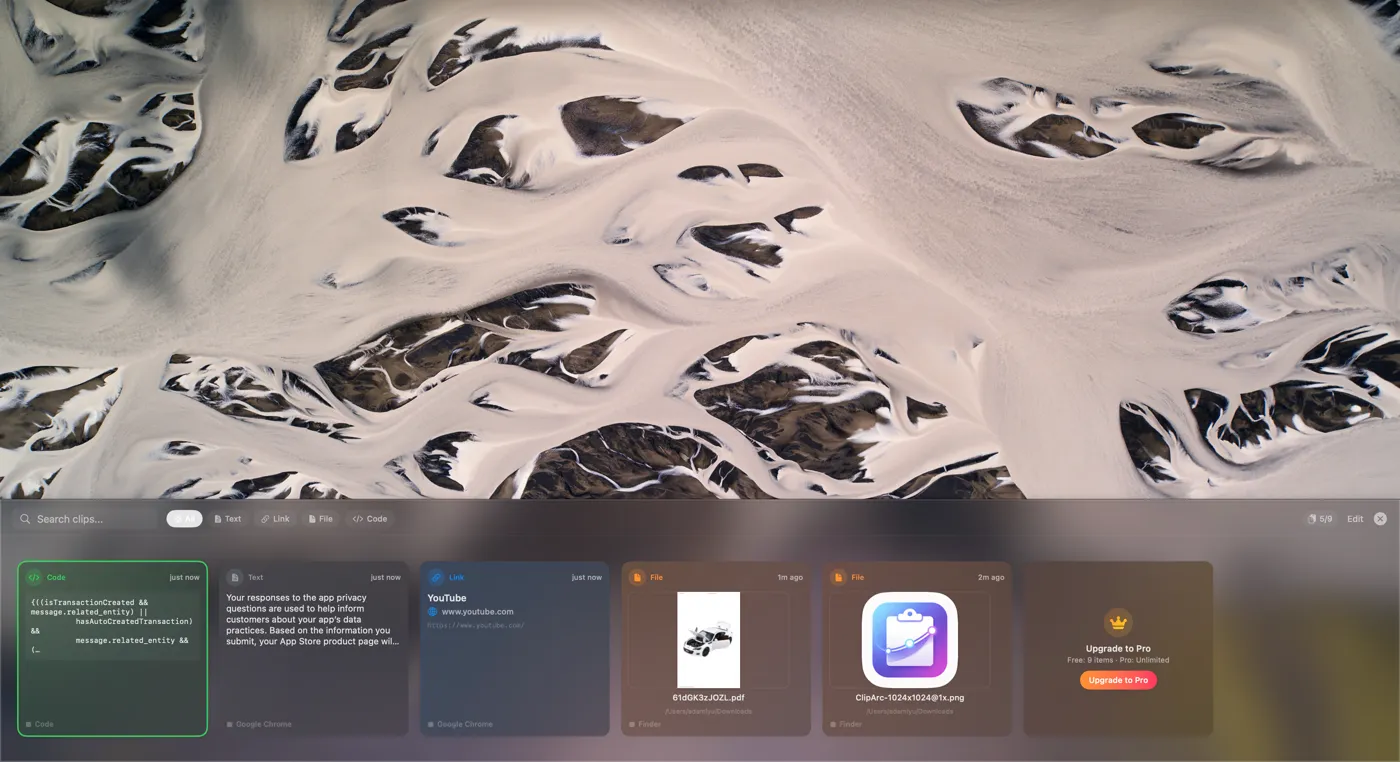
Automatically categorizes clipboard content into 10+ types: Text, URL, Image, File, Code, Color, Email, Phone, Number, JSON, and more.
Press Cmd+Shift+V anywhere to open your clipboard history. Navigate with keyboard, search, and paste in seconds.
Flexible fuzzy matching algorithm with smart relevance scoring. Real-time filtering across content and preview text.
Choose your preferred paste mode: Direct Paste (simulates Cmd+V), Copy to Clipboard, or Ask Every Time.
All data is stored locally on your Mac using SwiftData. No cloud sync, no accounts required. Your clipboard history never leaves your device.
Automatically detects and captures new screenshots from your designated folder. Supports system screenshots and third-party tools.
Code snippets, terminal commands, API keys at your fingertips
Research notes, quotes, and references always accessible
Color codes, images, and design assets organized
JSON data, numbers, and queries tracked automatically
Emails, contacts, and documents at your fingertips
Supercharge your workflow with unlimited clipboard history
Requires macOS 14.0 or later. Works on Apple Silicon and Intel Macs.